ChatGPT Business Hub for Multi-Location Brands: Claim and Optimize Each Listing, Leverage ChatGPT Insights
Business Hub lets you claim the card ChatGPT shows for each of your locations, fix its details and see how often ChatGPT shows it. Each location needs its own claim, and the payoff is edit access and measurement. Claiming won't make ChatGPT recommend you more.

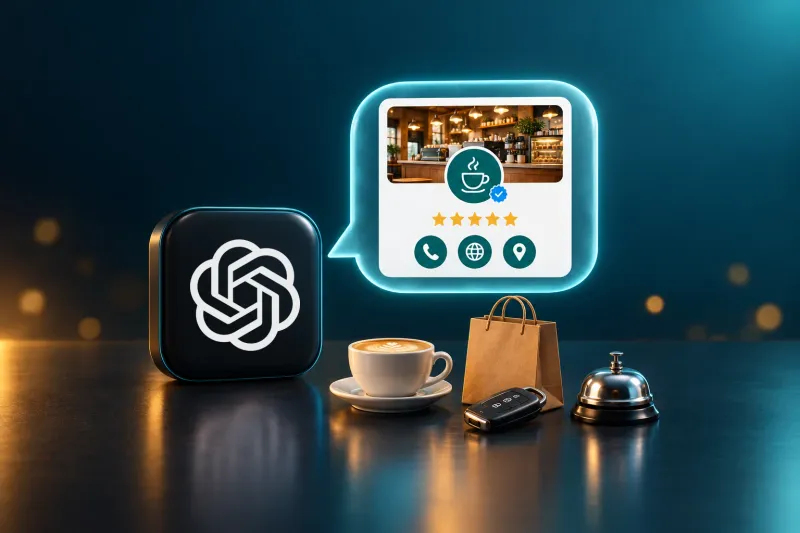
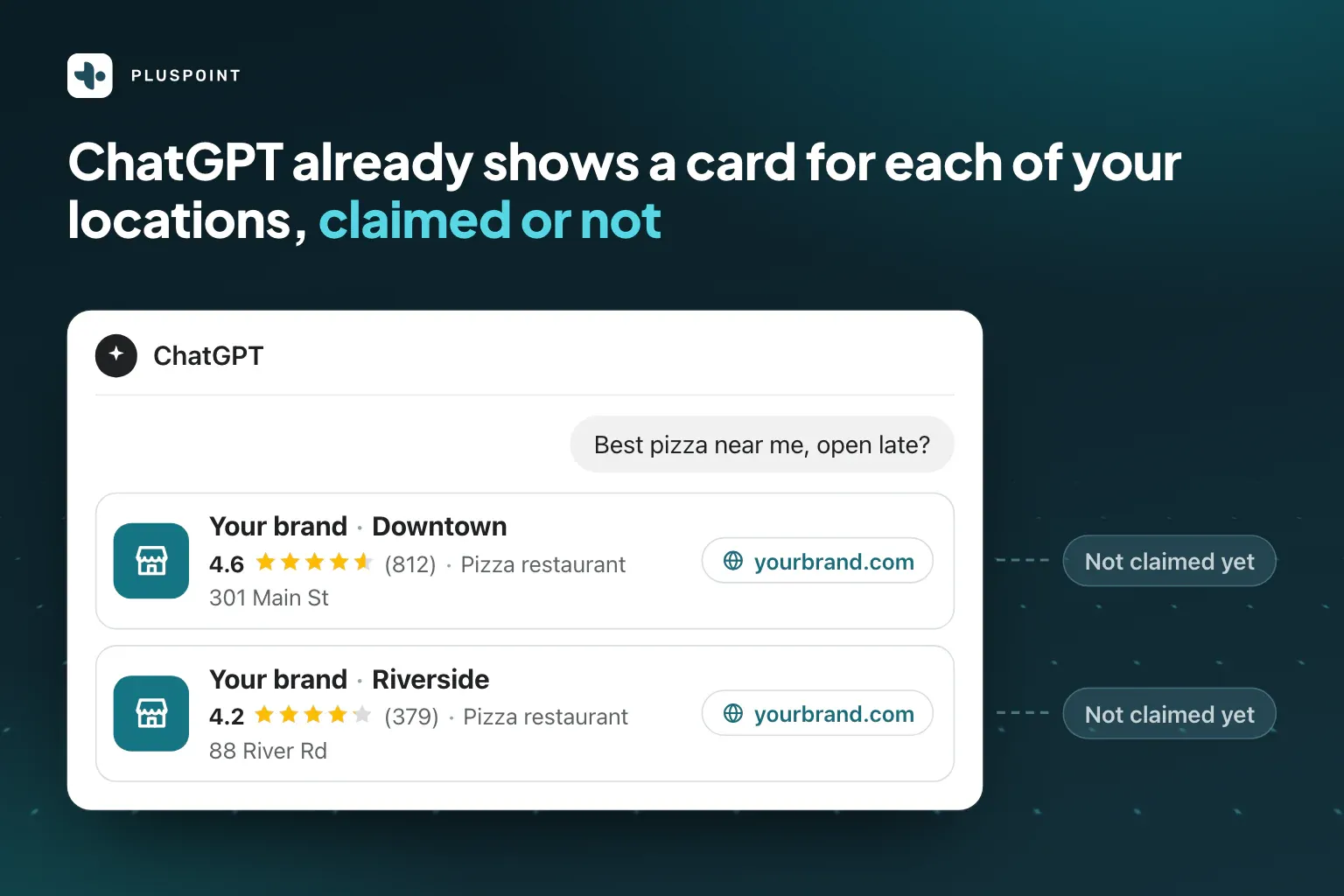
When a user asks ChatGPT to locate a nearby pizza restaurant or hotel in the downtown area, ChatGPT will provide business cards displaying the establishment’s name, star rating, address, and a link to its website. Chances are, your business’s listings are already showing up on these cards, whether or not you’ve claimed them.
OpenAI’s new Business Hub platform allows business owners to claim their listings, update information, and track ChatGPT listing performance metrics. You’ll see the business outcomes for brands that have verified ChatGPT listings, how to prepare, the steps to get there, and what results to expect.
TL;DR: ChatGPT Business Hub for multi-location brands
- Claiming a listing means you can edit the information that displays to potential customers. After the identity check, you get to update hours of operation, contact information, website, and images, and your listing earns a blue verification checkmark.
- Business Hub provides you with ChatGPT listing analytics to help you identify where to prioritize optimization efforts. Business Hub will count how often ChatGPT mentions your listings as well as how many people have viewed their profile or clicked through.
- Claiming listings will not influence how often ChatGPT recommends your listings. OpenAI explicitly states this. Reviews across all sources that ChatGPT reads as well as consistent listings will continue to be the determining factors of which listings appear.
- Before you start clicking "Claim", be aware that each listing must be claimed and identity-checked separately. Ideally, you should start by creating a single company account, optimizing all your listings, and having your legal team review the terms of service.
- Consider ChatGPT a new channel for your sales efforts. ChatGPT already allows users to book appointments and call businesses, and it sells ads. If you are looking to sell through ChatGPT, OpenAI says claiming your listings is the first step.
ChatGPT Business Hub: Claim the Listings Already Displayed in ChatGPT
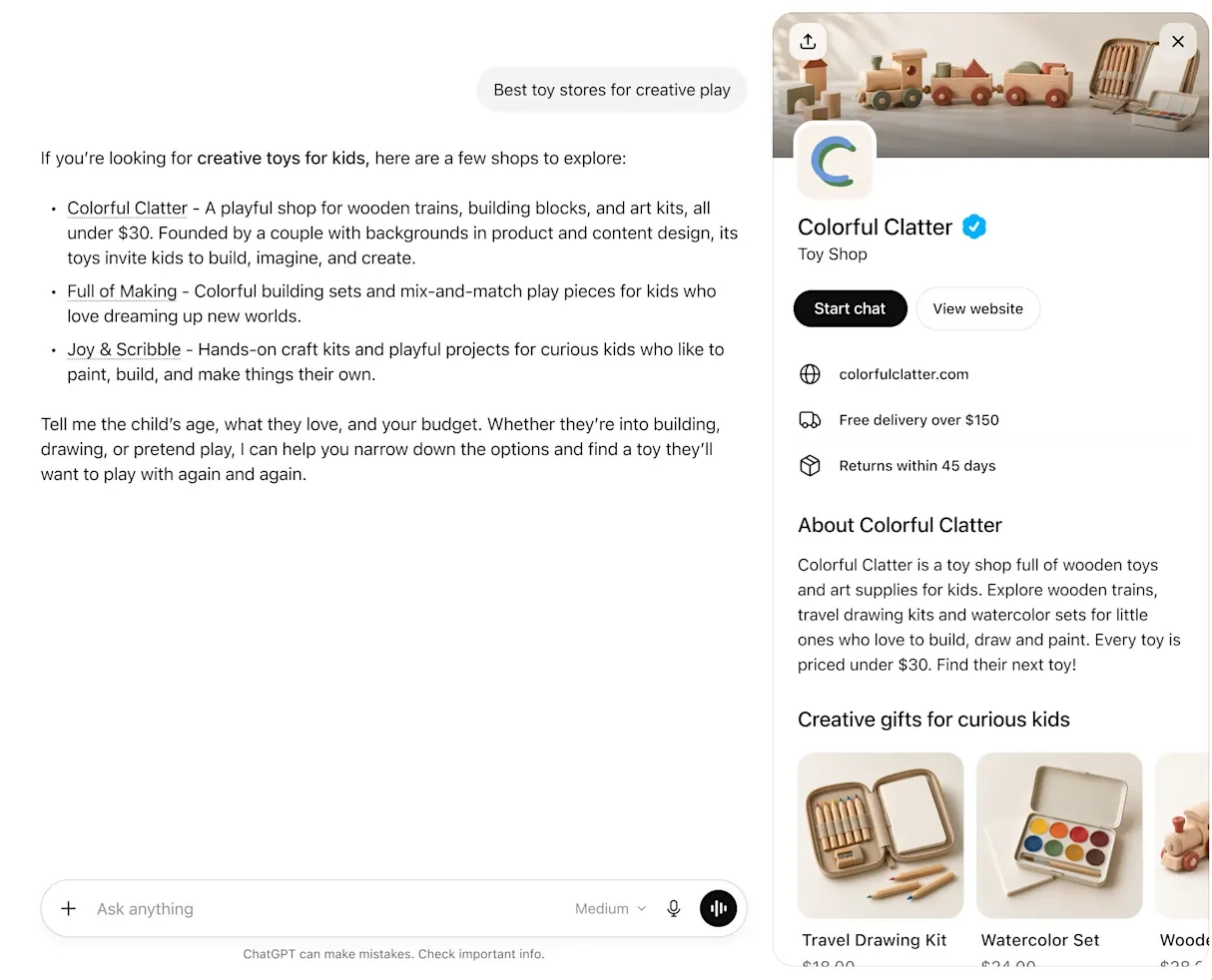
Business Hub is the business dashboard by OpenAI that launched in beta in November 2026. Through it, you can claim the listing ChatGPT displays for each of your locations, update part of it, and see how often ChatGPT shows it. The listing is what the user sees on the business card generated by ChatGPT when the LLM includes your business in its response.
It includes the category, address, phone number, star rating, and website. You do not need to create a listing. ChatGPT will generate these cards whether or not they have been verified. Instead, the work is to claim the listings that are already representing your brand.
It’s important to differentiate Business Hub from two other tools with similar-sounding names:
- ChatGPT Business: OpenAI’s paid team plan.
- Business Agent: a chatbot that some US-based e-commerce stores have published inside ChatGPT (not available for restaurants, hotels, or physical stores yet).
Claiming a ChatGPT listing is free. OpenAI has not mentioned any costs on its site, nor does claiming require an ad account.
Claiming a Listing via Business Hub: Get a Verified Listing and ChatGPT Insights
None of this is because ChatGPT will like your business more.
- You get a business card that directs people to the right place. You can update business hours, contact number, and website to make sure you are not redirecting users to outdated websites or a location that closed last year. You can also update your description and images.
- You earn a blue verification checkmark. After passing the identity check, your business card will display a badge. The hover text for this badge states: “OpenAI verified that this profile is managed by an owner or authorized representative.”
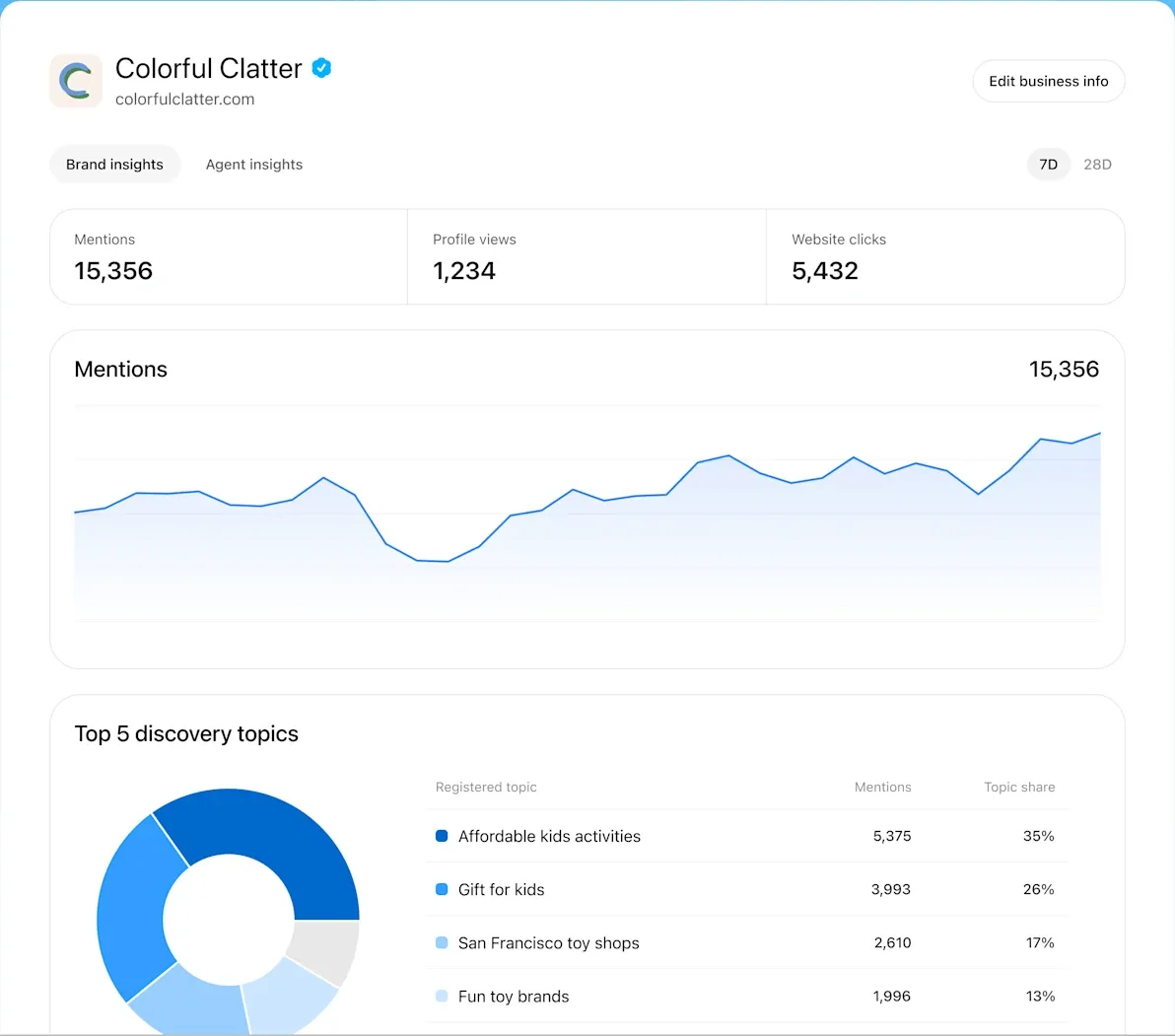
- You can track your ChatGPT analytics. Business Hub tells you how often ChatGPT mentions your listings, how many users have opened the listing and clicked through, and what those responses were about. Unlike third-party tools, which can only sample answers, Business Hub uses native tracking data from OpenAI.
- You can claim your listing before someone else does. Until a business owner claims a listing, someone else can try. The actual owner can contest the claim, but this takes more time than just claiming first.
Business Hub also allows you to add colleagues and an agency, giving the marketing team for each listing access to their own data. OpenAI has also chosen to keep some of its new features behind identity verification for now, so if product feeds and chat agents ever reach restaurants and hotels, you will be ready to use them with your verified listing.
What to do: Prioritize the most viewed listings
To begin, start with your most-viewed listings on Google, as it is likely that users will ask about them on ChatGPT as well. These listings’ numbers will fill in first and will help you establish a baseline to compare against the others.
Not a Prize-Winner: Claiming Your Business Hub Listing Will Not Influence ChatGPT Recommendations
As OpenAI states directly on their help page: “Claiming a profile or disputing ownership doesn’t change its visibility in ChatGPT.” So if someone sells you on claiming so you can “rank better,” they’re wrong.
According to this study by Pluspoint that looked at seven different industries, your listing will fill out the side card that accompanies the response, but pages other people wrote decide whether ChatGPT names you in the actual answer. Two thirds of the businesses in the side panel never even made the answer itself.
Reviews are also a factor, and it seems like volume outweighs average star rating. Researchers at NYU Abu Dhabi found that the restaurants recommended by OpenAI’s model had roughly three times the typical number of reviews, but barely higher star ratings. In addition, reviews count per location. When we looked at what ChatGPT says about real estate companies, it never added up the reviews from all locations with the same brand. It treated each location as a separate entity.
What to do: Get every location to ask every customer for a review
The one place where a famous brand can’t be depended on to help a smaller branch is on location-specific reviews. Make sure you ask all your customers and answer what they write.
Same company, different rating: ChatGPT often shows a Yelp or Tripadvisor rating instead of Google’s
Interestingly, the rating on ChatGPT’s side card often isn’t the Google rating. When we looked, ChatGPT would use information from Google but show the Yelp or Tripadvisor rating. That means your customers may see a rating that you don’t manage. And the gap can be huge, in either direction, as these three real life examples prove.
 Google profile


| Business | ChatGPT card | Google profile | Rating source |
|---|---|---|---|
| Toyota dealer, Dallas | 1.8 stars, 900 reviews, category “Toyota dealer” | 4.3 stars, 17,222 reviews, and the same category, phone and website as the ChatGPT card | Yelp: 1.8 stars, 900 reviews |
| Honda dealer, Phoenix | 2.4 stars, 1,100 reviews, category “Honda dealer” | 4.4 stars, 6,802 reviews, and the same category, phone and website as the ChatGPT card | Yelp: 2.4 stars, about 1,100 reviews |
| Hotel, New York | 4.6 stars, 9,316 reviews, category “Hotel” | 4.3 stars, 2,622 reviews, and the same category, phone and website as the ChatGPT card | Tripadvisor: 4.6 stars, 9,181 reviews |
It is especially problematic for organizations that only manage Google reviews. A dealer, for example, may ask all their customers for a Google review upon sale, but their Yelp reviews come from only the angry customers who looked it up. Then ChatGPT will show that Yelp rating to a prospective customer when they compare dealers. In July, MarTech reported a deal that lets ChatGPT show Yelp reviews and ratings, but there’s no way to edit them in Business Hub.
So now all review sites that ChatGPT accesses are part of a location’s reputation. As a multi-location reputation platform, Pluspoint pulls all review sites for each location into one inbox, from Google to Yelp and Tripadvisor. That way, you’re never in the dark when Yelp has a bad week.
What to do: Find out which rating ChatGPT displays for each location
Ask ChatGPT about your industry in the different cities you work in, and check the location’s side cards to see which review site the star rating comes from. Then request and respond to reviews on that site as well.
AI search now has metrics: ChatGPT is a new measurable channel for local marketers
Until now, nobody but OpenAI knew how many times ChatGPT mentioned your business. Marketers simply manually typed queries into the model and tried to extrapolate what they learned from the responses. Business Hub, meanwhile, provides official counts for all claimed locations. That means ChatGPT has now become measurable, like Google.
You may want to think about adding it to your reporting. The user base is big, with 1.2 billion weekly active users, according to OpenAI. OpenAI’s own estimates put the volume of search-style queries there at about one fifth that of Google. ChatGPT is already being used by consumers in a variety of sectors:
| Who | What they’re already using AI for | Source |
|---|---|---|
| US adults | 42% use AI chatbots to search for information | Pew Research Center |
| Consumers | 57% use AI tools to find local businesses at least monthly | Yelp funded research |
| Diners | 22% have used AI to help pick a restaurant | DoorDash |
| Travelers | 33% research trips with AI, almost as many as via search engines | Phocuswright |
| Auto buyers | 63% probably or definitely will use AI for their next car purchase | Cox Automotive |
ChatGPT isn’t yet driving much traffic, though. AI assistants only account for 0.4% of visits to ecommerce sites, Similarweb says, and Booking.com reports less than 1% of its room nights. Visitors from AI, however, are likely high-intent buyers. In retail, Adobe has found they convert 90% better than other visitors.
But for an organization with dozens of physical locations, that’s a whole different beast:
- Mentions are now a channel-level measurement: You can combine location-level mention and click data with your location-level Google impressions, calls, and reviews. And because budgets usually are allocated based on what you can track, that matters.
- Clicks don’t tell the whole story: A mention may not include a click, and an OpenTable or Yelp reservation never goes through your website. So include mention and reservation data by location along with your web traffic.
- Every review site matters: Ratings on Yelp, Tripadvisor, or other review sites matter, because the card can show them.
- A listing is now a prerequisite: Old phone numbers or websites on any site can end up on the card, or ChatGPT may call to find out.
- Paid ads are now in the same view as natural results: Ads appear below answers, so the card you claim and the ad you buy appear together.
With ChatGPT, the local search playbook now expands beyond a single map and a single set of reviews. ChatGPT crawls through review sites, reservation sites, and local news before naming a few locations. Organizations that maintain the quality of their location listings and their reviews will benefit the most and finally be able to measure it.
What to do: Include AI search metrics in your monthly channel report
Include mention and click data from ChatGPT in your monthly report for Google impressions, calls, reviews, and other channel data for each of your locations. Share that report with the same people every month. As the Business Hub only focuses on ChatGPT, include other AI tools that your customers use.
ChatGPT and reservations, calls, and ads outside of the business profile
Your business profile is only the beginning of your ChatGPT journey. In its own guide to selling via ChatGPT, OpenAI has outlined a step-by-step process for businesses to follow after claiming and verifying the profile. Businesses should allow ChatGPT’s agents to access their websites and make sure payment checks don’t block the purchases those agents make. Fortunately, much of this process already exists today.
| ChatGPT feature | Available today to | Your locations must provide |
|---|---|---|
| Restaurant reservations | Restaurants on OpenTable, Resy, or Yelp | Available tables on those sites |
| Hotel referrals | Hotels on booking sites or with a ChatGPT plugin | Current rates and photos there |
| Phone calls | All businesses that haven’t opted out | One or more phone numbers ChatGPT may dial |
| Ads | Self-serve advertisers in 89 countries, from $25 per day | One or more location landing pages |
| Product results | US online retailers, with checkout on their own site | Online product inventory (not in-store inventory) |
| Business Agents | US online retailers and service providers | Not available for physical locations yet |
The impact of the different features depends on the sector.
- Restaurants: Reservation availability is more important than an ad. In September, OpenTable seated 190,000 diners through ChatGPT, a small fraction of its monthly diners. ChatGPT also includes Yelp’s waitlist, so a restaurant accepting phone-only reservations is missing out completely.
- Hotels: ChatGPT sends travelers to a booking site or the brand’s plugin, so the rates and images there close the sale. Pluspoint includes your Booking.com, Expedia, and Tripadvisor reviews in the same inbox as your Google reviews, so you can see if one of those platforms is having a rough week.
- Car dealerships: In our testing, ChatGPT relied on the car manufacturer’s dealer locator, Kelley Blue Book, and CarGurus. As a result, your location listings on those platforms matter as much as the card. Only approved US financial advertisers may advertise car loans and leases.
- Retailers: The product feed covers online product inventory only. Uploading your product feed comes with a crawler waiver in the terms.
Note that restaurant chains should know that OpenAI prohibits advertising any alcohol with more than 0.5% alcohol by volume, including landing pages. Some businesses that claimed their profiles early saw offers for $500 in ad credits. According to claimants, this was a match on their first $500 in spend.
The ad buys you a seat beside the result, but the ChatGPT ranking guide outlines how to land that result.
What to do: Optimize your profiles and reviews before starting paid ads
Claim and verify your most active locations. Boost your reviews to a standard you’d be comfortable sharing with a stranger. Then test paid ads in two or three markets. Use a set budget with a cut-off point.
Ring, ring, it’s ChatGPT: AI calls businesses, but you can opt individual numbers out
ChatGPT can call a business on a user’s behalf. For example, if a user asks ChatGPT to call a restaurant and ask for its opening hours or to reserve a table, the restaurant’s use of Business Hub serves as consent.
You can opt out of calls on an individual number basis by visiting OpenAI’s opt-out page.
Since no business has publicly described a call from ChatGPT (yet), the outside world has yet to hear what ChatGPT says when it self-identifies.
For restaurants, the key issue will be human response. According to DoorDash, restaurants already miss about 40% of reservation calls. Imagine this scenario: It’s 7 p.m. on a Friday, a group of twelve shows up to a restaurant, and the phone rings. A polite AI calls and asks if you’ll be open the next day.
Generally, when ChatGPT calls a business about its hours, it means it was unable to confirm them via the Internet. Therefore, a cost-effective strategy to keep the phone from ringing would be to ensure your business has the correct hours listed everywhere.
For times when you actually want the phone to ring (e.g., to book a hotel or schedule an appointment at a car dealership), let your staff know what to expect.
What to do: Choose which phone numbers to allow ChatGPT to call
Keep calls on for phone lines where a real person is reliably available to answer.
Opt out of central phone numbers and call centers by going to OpenAI’s page and doing so on a per-number basis.
Ensure you list your business hours correctly everywhere so that you’ll get fewer calls in the first place.
Measure twice, claim once: Eight elements needed to prepare for location claiming
To save time, prepare all claims and data points once for your entire business, then do the following:
- Get the OK from legal. Since anyone that claims your location is representing and binding your entire company and affiliates, make your determination in writing whether it will be done by the head office or by each franchisee. Note that a franchisee’s claim will allow the head office to be added subsequently.
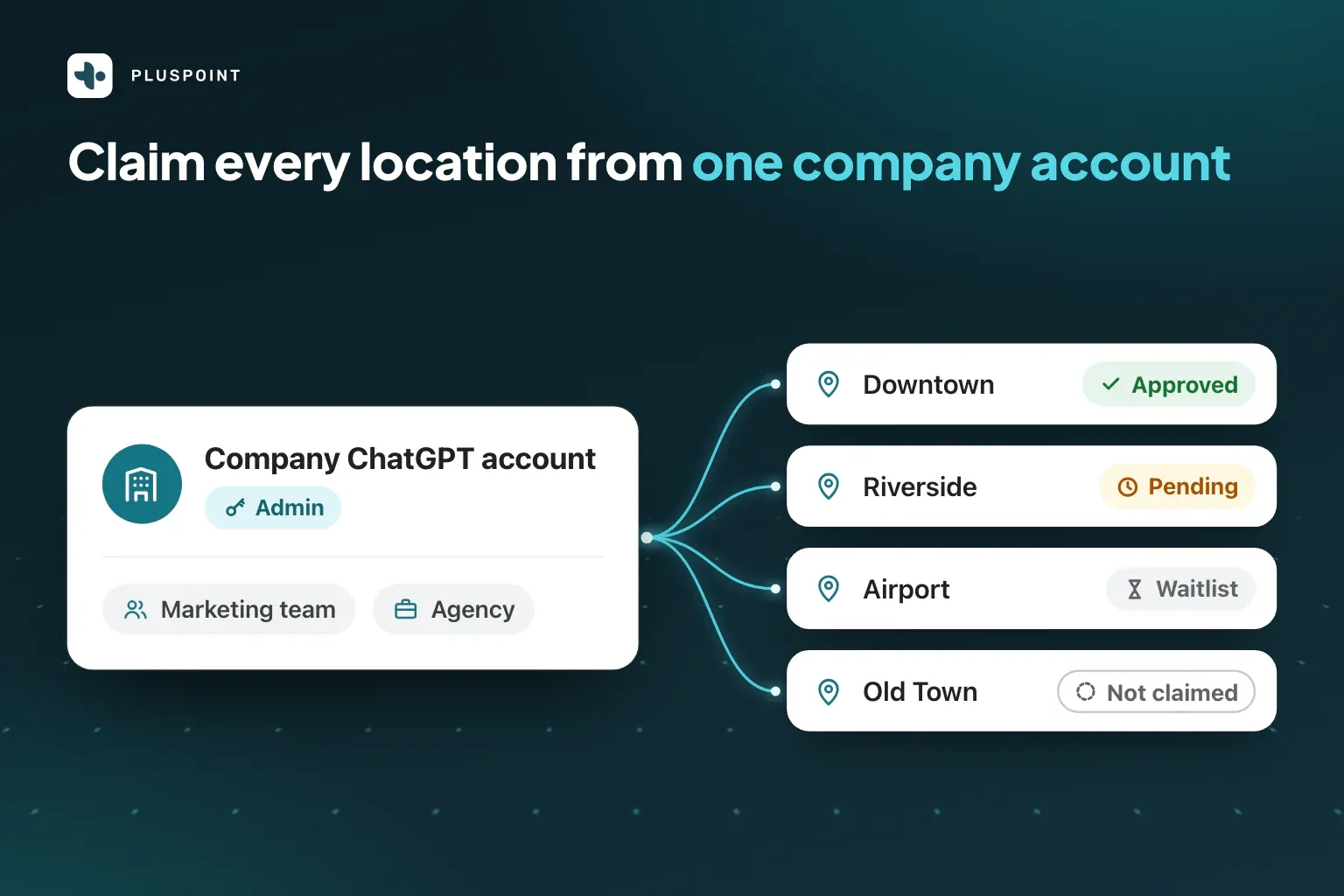
- Establish a company ChatGPT account. Each profile is tied to the account that claimed it, so don’t have anyone claim it using their personal account.
- Have the ID verification documents at the ready. Persona will ask for a government ID, your business registration, and your authority to claim the business, all of which must match official records.
- Have a means to verify each location. Phone verification doesn’t always work for central phone numbers, VoIP numbers, and call tracking numbers used by chains, so make sure to coordinate with the person responsible for your domain in order to conduct a DNS verification.
- Ensure your listings are clean. A card may contain outdated information from Google, Yelp, or Tripadvisor, so make sure all your locations’ details are correct everywhere, including on the major directories. Make sure to mark any location that has closed as closed as well. The claim search can potentially lead one of these to rank first. The Listings Sync feature from Pluspoint makes this task simple with its ability to keep all locations accurate and consistent everywhere: on Google, Facebook, and 200+ directories.
- Write your location descriptions. Write each location’s description of up to 300 characters outlining what makes it a good fit (e.g., a private room that can hold 20 people, truck parking). Additionally, compile at least three photos, a logo, a category, and hours for each weekday for each location.
- Make sure your website is crawlable by OpenAI. Your dashboard will show your Website access status. Make sure your website allows OpenAI’s crawler.
- Record a benchmark. Record each location’s Google views, calls, and directions requests. Also, make note of what ChatGPT answers today about your category in each city for comparison later.
What to do: Start with the listings today
Since fixing listings takes the longest and doesn’t require a claim, start with these while your legal team reviews the terms. Focus on the busiest locations first.
Your entire company is bound by the Business Hub terms, so have a lawyer review them first
When you use Business Hub, you agree to the Businesses in ChatGPT terms, and anyone who claims a location certifies their ability to bind your company. There are four important terms when considering this for a company.
- OpenAI keeps the final say over your listing and can add to, edit, or replace what you enter.
- OpenAI gets a perpetual right to publish basic information about your business (e.g., your name, address, and hours).
- Your company and affiliates agree not to sue over content on any of your websites, past and present. (Are franchisees considered affiliates? This is for your lawyer to decide.)
- A product feed waives opt-outs and allows OpenAI’s crawlers to access your website.
The above isn’t legal advice. The terms of service could change at any time. We highly recommend having a lawyer go through the terms of service once before anyone in your organization starts claiming any locations.
Claiming a location in the ChatGPT Business Hub: five steps
The location claim process in the ChatGPT Business Hub has five steps. The one that takes the most time, identity verification, can take days. Two of the steps can lock up a location for days, too.
- 1 Sign in with the ChatGPT account that will be the owner of the locationMinutes
Don’t use your own personal ChatGPT account. Use a company ChatGPT account. On the web, go to Business Hub from the sidebar.
- 2 Find the location listingMinutes
Search for the location by name. If you don’t see the listing, try entering the city or neighborhood. Make sure the location’s address is correct when you select it. The search may list closed businesses at the top of results.
- 3 Prove you control the locationMinutes
The hub may send a verification code to your business phone number or email, ask you to enter a DNS record or connect with Shopify. This will vary based on the location listing.
- 4 Wait for OpenAI to review itSeconds to days
OpenAI will review every location claim and send you an email notifying you of acceptance or a request for more information.
- 5 Complete identity verificationMinutes to days
Persona is OpenAI’s identity provider. You will need to upload your government ID, business registration and proof of your authority to act on behalf of the business. The name, address and registration number must align with official records. You won’t be able to publish edits or see any numbers until you complete this step.
The identity verification step is where most claims get stuck. Several owners have described on OpenAI’s developer forum that Persona rejects them without an explanation and gives them no way to try again. Be sure to input the legal information exactly as it appears in your registration. Make sure the person whose name appears on the authority papers is the one doing the verification step. They are likely to be on vacation.
If the phone verification doesn’t work, the DNS process is likely to be more successful. Be aware that the verification code will expire. Make sure you have your domain manager available to input the verification. Don’t be in a rush. Support can remove a profile you haven’t published, but not one you have.
Bulk claiming not yet available in Business Hub: claim one location at a time
It’s clearly stated on OpenAI’s help page that “Claiming the main brand doesn’t claim its locations.” If you have 40 locations, you need to claim them all one at a time. Each one may play out differently. One consulting company claimed all three of their offices in the US on the same day the Business Hub launched. OpenAI approved one in about 20 seconds, one went into pending and one went onto a waitlist.
OpenAI told Adweek they will introduce bulk claim tools over time, but they didn’t provide a timeline. If your company already works with OpenAI as an Enterprise customer or advertiser, ask your OpenAI contact about a managed claim first, because in that process OpenAI locks your location profiles until you claim them.
This highlights the importance of the claimer. The profile will belong to the ChatGPT account that claimed it. Owners have found no way to transfer it later. If the profile is claimed by someone such as an assistant manager who signs in to a personal account and then leaves, the profile will leave, too. Pluspoint’s guide on managing Google Business Profiles at scale advises the same thing for Google: One company-owned account should be the owner, and you give people access through that account.
What to do: Build a spreadsheet
Document each location with its status (approved, pending, waitlisted or unclaimed) and a follow-up date. One company got three different statuses in the span of a single afternoon.
Business Hub insights: ChatGPT mentions businesses far more often than it sends click-through traffic
Business Hub provides you with four metrics over the last 7 or 28 days: mentions, profile views, website clicks and the top five discovery topics. A mention is any time ChatGPT includes the location in its response, whether anyone clicks or not. The discovery topics show you what the responses were about. ChatGPT will never give you the specific questions people asked.
These numbers will appear when you’ve passed the ID verification process. They will lag by around two days. Blank figures mean the number is below an undisclosed limit OpenAI has put in place, so don’t assume the number is actually zero. Your first dashboard already covers the weeks before your claim, so make sure you don’t regard this as a ‘result’ but a ‘baseline’.
ChatGPT’s mentioning of businesses happens far more frequently than referring to their websites. Search Engine Journal’s dashboard shows that for every 100 times ChatGPT mentions the publication, it generates fewer than one website click. ChatGPT is like your pal, who at every dinner party talks about your restaurant, but never gives anyone the address! The first wave of early adopters has started sharing their numbers, with all but one of these businesses being in the digital world:
| Business | Type | Mentions | Website clicks | Clicks per 100 mentions |
|---|---|---|---|---|
| Search Engine Journal | Publisher | 353,356 | 2,663 | 0.8 |
| Behind Rankings | Online media brand | 1,054 | 12 | 1.1 |
| Fortivus | Online brand | 58 | 1 | 1.7 |
| An agency office in Estonia | Local listing | 0 | 0 | none |
There’s been no data shared yet from restaurant chains, hotels or dealerships, so businesses from these sectors starting to measure now will take an early lead in their market. For a chain, the real value is in comparing the performance of each location, and beginning with the location that is least mentioned in ChatGPT. Next month, check if the figure has improved. Remember that AI results fluctuate a lot. Comparing day to day isn’t reliable, so always compare month to month. In fact, Pluspoint’s restaurant study found that asking the same question twice resulted in the same list of restaurants less than half the time.
Also note that Business Hub doesn’t track calls, directions or bookings, so make sure you’re comparing this with your location’s Google metrics. In reports by medium, ChatGPT’s card clicks can also go under the Google data, since many of the links in the cards have the same tracking tags as your Google profile. To keep ChatGPT traffic separate from your Google analytics, be sure to create a website link with your own tracking tags for each card.
What to do: Start ranking your locations by mentions each month
Since there’s no historical data in the dashboard, make sure to keep your own record of your locations’ data on the same day of the month. Rank your locations according to mentions and clicks, and use that information to prioritize your bottom five locations for listing and review management activities. You should then check those locations’ Google calls and direction requests to see if ChatGPT mentions translate to footfall.
Monitoring AI visibility of your locations on ChatGPT, Gemini, and Google Maps
Today, Business Hub will only track how many times ChatGPT mentions your business. This feature will not show you what queries people ask, which competitors are coming up, what sites it cites, or what the trend of mentions looks like. The feature will also not track your business’ visibility on Gemini and Google Maps. Not only do the two services provide additional visibility opportunities, but people will frequently ask the same question on both Gemini and Google Maps when they are on their way to your place of business.
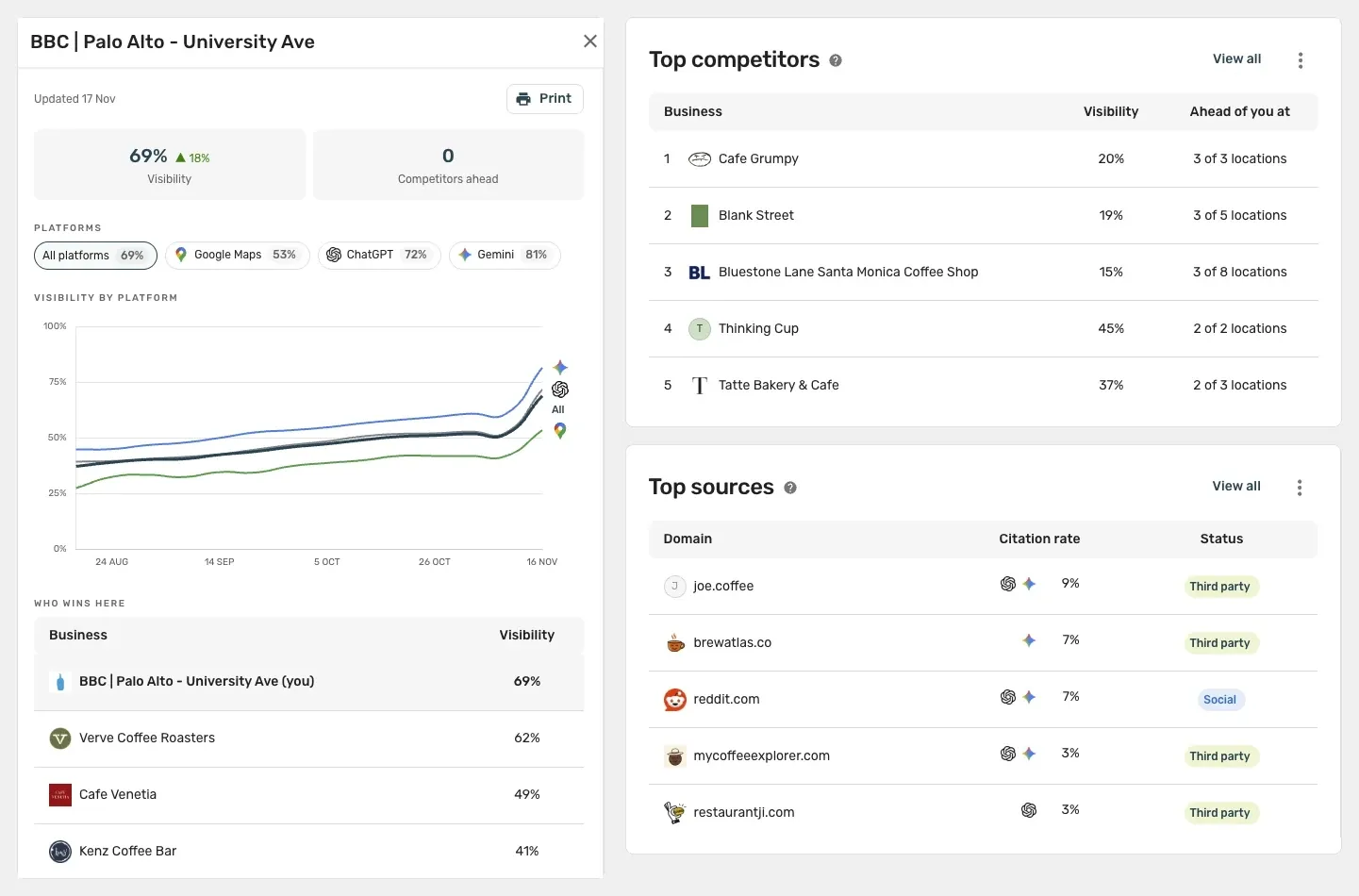
To bridge this gap, we’ve built Pluspoint’s AI Visibility feature to track your locations’ mentions on ChatGPT, Gemini, and Google Maps. The feature will ask these three services for recommendations on a weekly basis, just as a customer near each of your locations would. Pluspoint will track visibility of your locations locally so you don’t have a high-traffic downtown location masking a low-traffic suburban branch. The feature will show you an overview of how often your locations show up on the services and the trend over time.
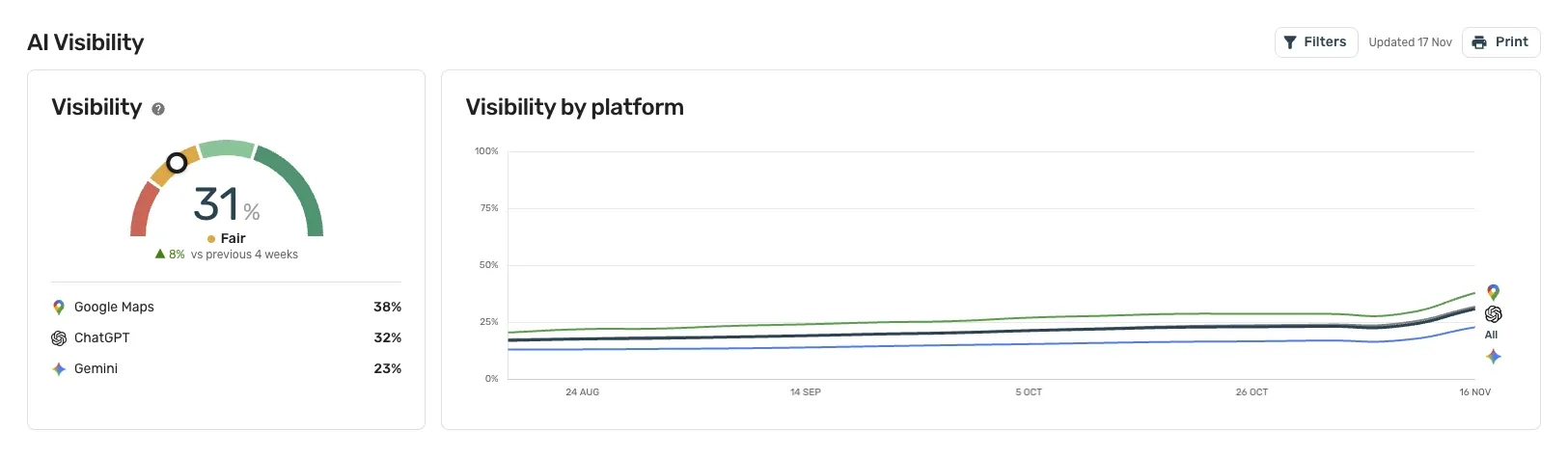
When you click into a location, you’ll see its individual score on each service, the trend graph since the tracking started, and what businesses rank highest in its local area. This means you’ll have proof of the time you spend on each location instead of conjecture. Pluspoint will also rank the competitors that AI names instead of you and most cited sites on the services, across all your locations. If one of the top sites is a directory, the feature will also show you whether or not you are correctly listed. These two pieces of data will reveal where you are getting beaten in rankings and what sites in your category aren’t mentioning you.
| Want to see | Business Hub | Pluspoint AI Visibility |
|---|---|---|
| Frequency of mentions per location | Yes, using OpenAI’s own data | Yes, using weekly sampling |
| Past month’s data | No, manually record data | Yes, using weekly trend |
| Gemini and Google Maps visibility | No | Yes |
| Top competing businesses | No | Yes, per location |
| Top cited sites | No | Yes, even down to a specific page |
| Correct listings on those sites | No | Yes, as well as identifying conflicts |
| Non-USA locations | Not yet available | Yes |
| Ability to edit ChatGPT card | Yes | No, still available through Business Hub |
What to do: Begin AI tracking before you make changes
Before you go and start claiming locations, fixing your listings, and asking customers for reviews, start a weekly AI tracking system on all of your locations. This way, you’ll have data to see which changes you’ve made are impacting your metrics.
Claiming your local listings: edit access comes within days, ChatGPT mentions take months
Claims will give you edit access and metrics within a few days, but the increased AI mentions will take time. Results in this area will take time to accrue. There are different things to look for at different stages of the claiming process:
| When | What you’ll gain | What to look for |
|---|---|---|
| Right after verification process | Blue checkmark and initial changes to cards | Review the website and photos on each card |
| Right after initial dashboard access | 28 days worth of data on mentions, clicks, and topics | Data baseline, not results |
| Right after one month | First month-over-month data | Which locations show up the least on ChatGPT |
| Right after three months | Long-term trend data beyond singular answers | Did your work result in an increase in mentions? |
Initial signs are positive: In Invoca’s call data, 49% of calls from people who came through ChatGPT were real sales leads, versus 43% of calls generated from a Google profile. However, the volume is still low, so take your initial measurements on quality first, then volume later.
What to do: Try it on three locations first
Select three low-ranking locations, work on their listings, and request reviews from each customer. After three months, compare these locations’ mentions and weekly AI visibility to those of three similar control locations. Then, begin rolling out your best practices.
Outside the US, you can buy ChatGPT ads but can’t claim local listings yet
Non-US-based businesses will be able to purchase ChatGPT ads, but they won’t be able to claim their local listings just yet.
According to OpenAI’s help center, local stores and restaurants “can currently claim only an existing U.S. listing.” Agencies in Spain, Brazil, Australia, and Canada have ended up on the waitlist. One agency in Perth reported adding 14 businesses to the list and ending up with all 14 queued. OpenAI told SmartCompany that broader availability is coming soon but did not give a timeline. The extended window gives non-US businesses a chance to remedy their data and sort out location ownership before the doors open.
ChatGPT still shows non-US business locations, but the real value remains in the same strategy as US businesses: getting accurate reviews and listings on each location’s ChatGPT-read pages. These pages vary by country. For example, in Brazil, Portugal, and Spain they are often different from the ones US guides name. Business location ads in ChatGPT work differently. The ChatGPT ads feature is open for self-service in most of Europe and Latin America. This means that a Lisbon business can purchase an ad that appears under a ChatGPT answer, but they can’t claim their own ChatGPT card.
So, non-US businesses can’t claim their cards, but they can track performance. Let’s get started.
What to do: Join the waitlist and optimize ChatGPT information
Add all your business locations to the waitlist. Then put your energy into optimizing ChatGPT information now: Get reviews on all of your business location Google profiles and optimize for the local directories that matter in your country.
Pluspoint keeps the reviews and listings ChatGPT reads right at every location
If your business has 40 locations, you should have 40 ChatGPT profiles, 40 Google Business Profiles, and hundreds of local directory listings that ChatGPT reads. No single person can keep all of this information up-to-date, and this information will be out of sync by next week. No one opened a restaurant so they could manage listings. Pluspoint takes care of that. We request reviews from every customer after they visit your business.
We respond to reviews using AI. We centralize your review inbox and bring your Google, Yelp, Tripadvisor, and other review site reviews together. Pluspoint’s Listings Sync keeps your business location information in sync across Google, Facebook, and 200+ directories. Pluspoint MCP lets ChatGPT or Claude check every location for you. Pluspoint starts at $29 per location per month (with Listings Sync as an add-on).
Frequently asked questions about ChatGPT Business Hub
What is ChatGPT Business Hub?
ChatGPT Business Hub is a business dashboard created by OpenAI. OpenAI launched this ChatGPT tool in beta in November 2026. ChatGPT Business Hub is where you can claim your business' ChatGPT profile, edit your business information such as website, description, category, and images, and view the mention data for the past 7 or 28 days.
What do I get when I claim my business on ChatGPT?
When you claim a business location on ChatGPT, you can edit the card that appears in ChatGPT. This includes the business' operating hours, contact phone number, website, and photos. Once Persona verifies your identity, the card will display a blue checkmark. You will also see mention, click, and topic data for the location.
Is ChatGPT Business Hub free?
OpenAI's help center doesn't mention a claim price. You do not need to sign up for an ads account or an Enterprise plan to claim. The ads tool is a separate product with its own budget. Early adopters, for example, received a $500 ad credit offer that claimants describe as a match on their first $500 of ad spend.
Will claiming my business increase my ChatGPT recommendations?
No. According to OpenAI's help center, claiming or contesting the ownership of a profile won't affect how often it shows up in ChatGPT. ChatGPT uses the information it reads about your location, such as reviews and listings, to determine what to recommend.
What can I edit on my ChatGPT business profile?
According to OpenAI's help center, you can edit your business' website, description, category, logo, cover photo, delivery and return policies. Those who were able to claim the business report fields for phone number, email, address, and weekday hours. Descriptions are limited to 300 characters, and OpenAI will review your edits before publishing.
Can I claim all my locations at once in ChatGPT?
Not at the moment. You can't claim your locations by claiming your brand, and OpenAI doesn't offer a centralized business profile management tool. You have to claim and verify identity for each location. Enterprise customers and advertisers should reach out to their OpenAI rep to ask about a managed claim.
How long does it take to claim a business on ChatGPT?
The approval time may range from seconds to days. OpenAI has approved some early verifications via DNS in as little as 20 seconds. Meanwhile, some requests are currently pending, on the waitlist, or have failed the Persona ID check. You can't publish changes or see statistics until the Persona ID check passes.
What constitutes a mention in ChatGPT Business Hub?
For a local business, a mention means ChatGPT displays any result for the place, even if it's never clicked on. For an online business, a mention only counts when ChatGPT mentions the business' website. Business Hub shows you the number of mentions over the past 28 days.
What can you expect once you've claimed your business on ChatGPT?
First, you get edit access and tracking. Once OpenAI reviews your changes and approves them, they go live. Your first dashboard establishes a 28-day baseline. You'll also be able to compare that with monthly statistics. You'll also know which locations are the least visible in ChatGPT. Second, if you increase your mentions, it's because of the effort you put into your reviews and listings. You should evaluate the improvement over a period of approximately three months.
How does ChatGPT Business Hub affect local marketing?
This tool is the first official way for a brand to know how many times each location has been shown on ChatGPT. It opens the doors for AI search to be part of the same monthly report as Google. But ChatGPT also goes further by reading several listing sites such as Yelp or Tripadvisor and taking into account every listing a place has, including ratings.
How can I track how many times ChatGPT brings up my locations?
Business Hub shows you the number of mentions and clicks provided by ChatGPT itself. On the other hand, for competitor analysis, references, history and other assistants like Gemini and Google Maps, you'll need to ask the same questions every week with a tracking tool like Pluspoint's AI Visibility.
Why does ChatGPT show a different rating than Google?
ChatGPT's card can display the rating from a different website. When we asked ChatGPT to list local businesses, the category, phone and website on the chatbot's cards reflected the businesses' Google profile, but the ratings came from Yelp or Tripadvisor. For example, a Toyota dealer had 4.3 stars on Google but only 1.8 on ChatGPT.
Can businesses outside the US claim their locations on ChatGPT?
Not yet. According to OpenAI's support page, local stores and restaurants "can currently claim only an existing U.S. listing." Several agencies in Spain, Brazil, Australia and Canada have ended up on the waitlist. OpenAI is promising to increase the availability of this new tool soon but it has not given an exact date.
Can ChatGPT call my business?
Yes. ChatGPT can make phone calls to businesses on behalf of a user, for example, if they want to ask about the business's opening times or make a reservation. By using Business Hub, you agree to let ChatGPT do this per OpenAI's terms of service. You can opt a single phone number out on OpenAI's opt-out page.
What if someone else claims your business on ChatGPT?
You can challenge the claim from your profile menu by verifying your authority through Persona, OpenAI's identity check. While there are currently no reports of hijacked listings, support cannot remove a published profile, so it's easier to claim it first than challenge it later.
Is ChatGPT Business Hub the same as ChatGPT Business?
No. ChatGPT Business is OpenAI's paid plan for teams. Business Hub is the dashboard to claim your ChatGPT profile (how your business appears in ChatGPT answers), edit some of the information, and see how many times ChatGPT has shown your profile.