
Turn every visit into a Google review with a free QR code generator
Your code is ready in about thirty seconds. Customers scan it at the counter and leave the review while the visit is still fresh, which beats chasing them by email later.
The code is yours to keep. It never expires.
- Free forever, no account
- No app to install
- Works with any Google listing
How to use your Google review QR code
Generate your QR code
Enter your email address and select your Google Business location. We'll email your custom QR code in seconds.
Share it with your customers
Print the QR code on receipts, flyers, menus, or posters, or display it digitally at your checkout counter or website.
Watch the reviews roll in
Customers simply scan the QR code and are taken directly to your Google review page, no hassle, no extra steps.
How to Get Your Google Review QR Code Scanned
The code above took thirty seconds. Getting it scanned is a different job, and it is the one that separates a counter sign pulling two reviews a month from an identical one pulling twenty. What follows is the full guide: other ways to make a code if you need one, then print specs, placement, what the sign should say, how staff bring it up, and the rules that keep the reviews you collect from being deleted.
What Makes a Google Review QR Code Work
Reviews decide the visit, scanning is already a habit, and the code itself has two settings that decide whether it reads at all.
A table tent read at arm’s length needs roughly 2.5 cm. A poster read from across the room needs a code the size of a coaster. The working rule: at least one tenth of the distance.
At level H roughly 30% of the code can be covered and phones still read it, which is what a centered logo amounts to. Drop to L and the same design dies on a greasy table.
Review figures: Capital One Shopping, online review statistics, updated 6 July 2026. Scan figures: Bitly, The State of QR Code Scans in 2026 (2024–2025). Error-correction levels are the ISO/IEC 18004 standard for QR codes.
You can get a QR code for Google reviews three ways. Google quietly builds one into every Business Profile now, though almost nobody finds it. Our free generator at the top of this page makes a branded version, logo included, in about the time it takes to read this paragraph. And if a print vendor insists on their own system, the old manual route still works: dig out your Place ID, build the review link, hand it to any QR tool. Whichever route you take, a customer points a camera and your Google review form opens with the stars waiting.
Honestly, that’s the easy 5% of the job.
We know because we’ve watched the same laminated code pull two reviews a month at one location and twenty at a sister location of the same brand. Same code, same printer, same offer. What differed was everything around it: the spot on the counter, the six words on the sign, whether anyone on staff ever said a word about it. Most guides end at “download your PNG,” so this one spends its length on what comes after. The audience justifies the effort, too: 97% of consumers read reviews of a local business before visiting, per Capital One Shopping’s research roundup updated in July 2026.
Three Ways to Create a Google Review QR Code
A quick read on which to pick. Google’s own code costs nothing and looks like it: black, white, no logo. Ours is free too and comes out wearing your brand. The by-hand route takes ten minutes or so, and it earns its keep the day an agency or print vendor asks for a link instead of an image. Placement and the ask will move your numbers far more than this choice, so don’t agonize here.
Option 1: Google’s Built-In QR Code
For a single counter sign, this may be all you need. Open your Google Business Profile on a computer, select Read Reviews, then Get more reviews, and a share link appears with a QR code sitting next to it. Right-click, save the image, done.
Two catches. Google only generates the code on a desktop browser (its own help page says so, and mobile users are out of luck), and what you get is bare: no logo, no brand color, no count of how many people ever scanned the thing.
Option 2: The Generator at the Top of This Page
Yes, we make one of these tools, and yes, it is the one sitting at the top of this page. It stays free whether or not you ever talk to us, so consider the pitch finished.
A few things it does better than the generic QR sites. It searches Google for your actual listing, so the code points at your exact review form with zero Place ID hunting. Your logo goes in the middle, the colors match your brand, and you get both a PNG for quick jobs and an SVG your print shop will accept without sighing. No watermark, no account, and the code never expires.
Jump back up to the generator, it is the same tool, sitting at the top of this page.
(Teams running on Pluspoint get the bigger version of this: unhappy customers get caught in a private feedback form before they reach Google, review invites go out over SMS and WhatsApp, and reply drafts appear when reviews land. For one counter sign, none of that matters yet.)
Option 3: Build the Review Link by Hand
Useful when your agency or print vendor insists on their own QR system, or when you want the raw link for email and SMS campaigns too.
- 1 Find your Place ID
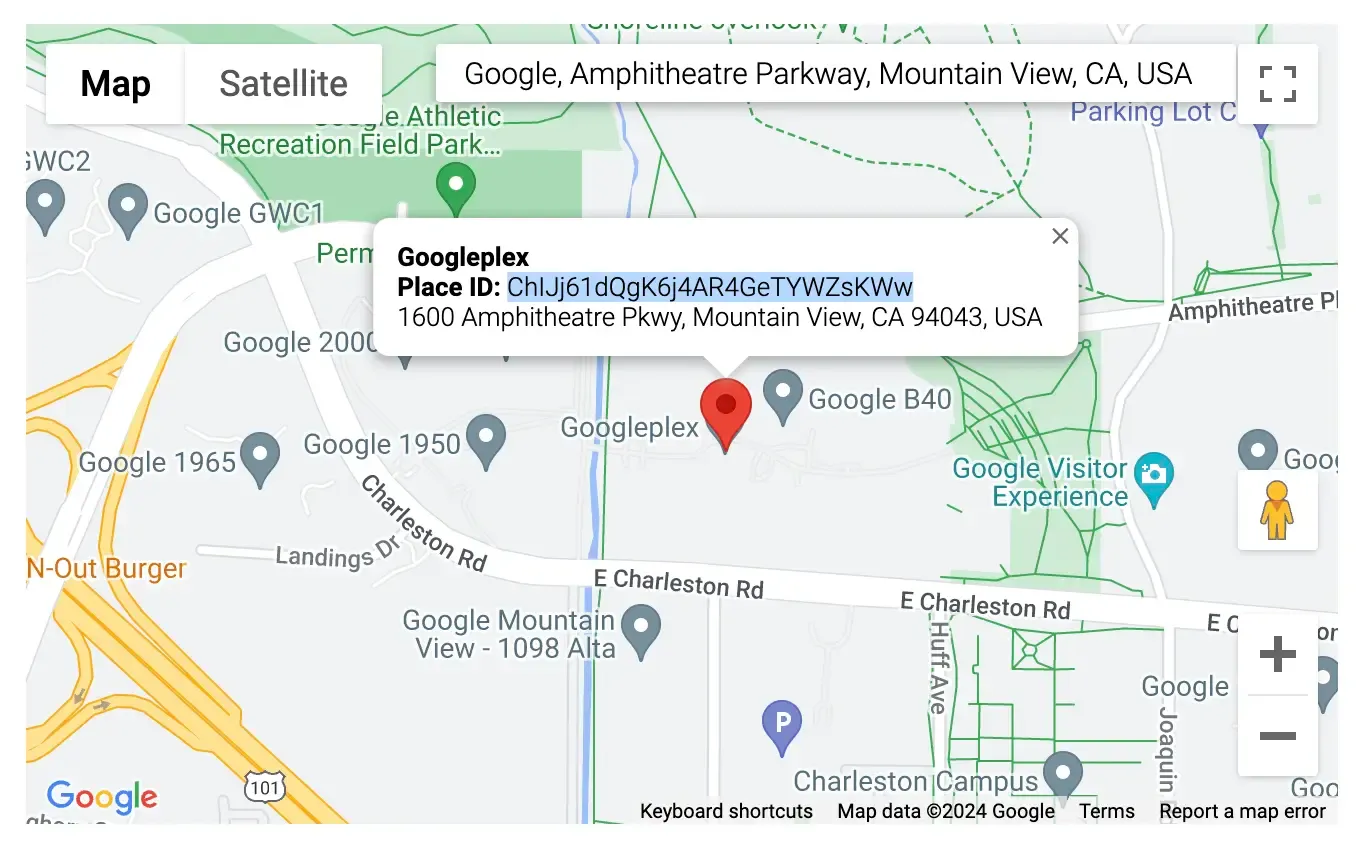
Open Google’s Place ID Finder and type your business name. The map drops a marker with a string like
ChIJN1t_tDeuEmsRUsoyG83frY4. - 2 Copy the Place ID
Copy it exactly. One wrong character sends customers to a review form for someone else’s business.
- 3 Build the link
Paste the ID after the equals sign in
https://search.google.com/local/writereview?placeid= - 4 Test it in an incognito window
The link should open your review form with the star picker ready. Test it logged out, on a phone, before anything gets printed.
- 5 Feed it to any QR generator
Paste the link, download the code, and run one test scan from an arm’s length away.
The writereview link is stable, but Place IDs can change when listings merge or a business moves. If a big print run is on the line, point the code at a short URL you control, something like yourcafe.com/review, and redirect that to Google. Should the link ever change, you update one redirect instead of reprinting every menu in the company.
Why a Google Review QR Code Fails to Scan
Nobody squints at a QR code twice. If a distracted person holding a coffee can’t scan it inside a couple of seconds, your review count will behave as if the code isn’t there. Almost every failed code we’ve come across in the wild traces back to one of four things.
- Size follows distance. Rule of thumb: the code should be at least one tenth of the scanning distance. An arm’s-length table tent needs roughly 2.5 cm (1 inch); a poster read from 3 meters needs a 30 cm code. When in doubt, go bigger.
- Leave the quiet zone alone. The white margin around the code is part of the code. Crop it in Canva to make the design “tighter” and phones start ignoring the whole thing.
- Adding a logo? Set “error correction” to H. Most generators hide a setting with four letters, L, M, Q and H. It controls how much of the code can be covered or smudged before phones stop reading it, and H is the toughest: around a third of the code can disappear and it still scans. A centered logo is, to the camera, damage. On the lowest setting the same design reads fine on your monitor and dies on a greasy table.
- Matte beats gloss. Glossy lamination under a pendant light throws glare exactly where the camera needs contrast. Matte stock, dark code on light background, never inverted.
And then run the test almost nobody runs. Scan the final printed object, in the actual spot, in evening light, with one iPhone and one Android. Takes thirty seconds and it has saved us from at least two embarrassing reprints.
Where to Put a Google Review QR Code
Put the code where the mood peaks and the phone is already out. The same customer who walks straight past a sticker on the door will scan one two minutes after telling the server “that was great,” so the surface matters less than the moment attached to it. And the scanning habit needs no warm-up anymore: Bitly’s State of QR Code Scans report measured scans up 42% year over year in Europe and 40% in Latin America, growing faster than new codes are being created.
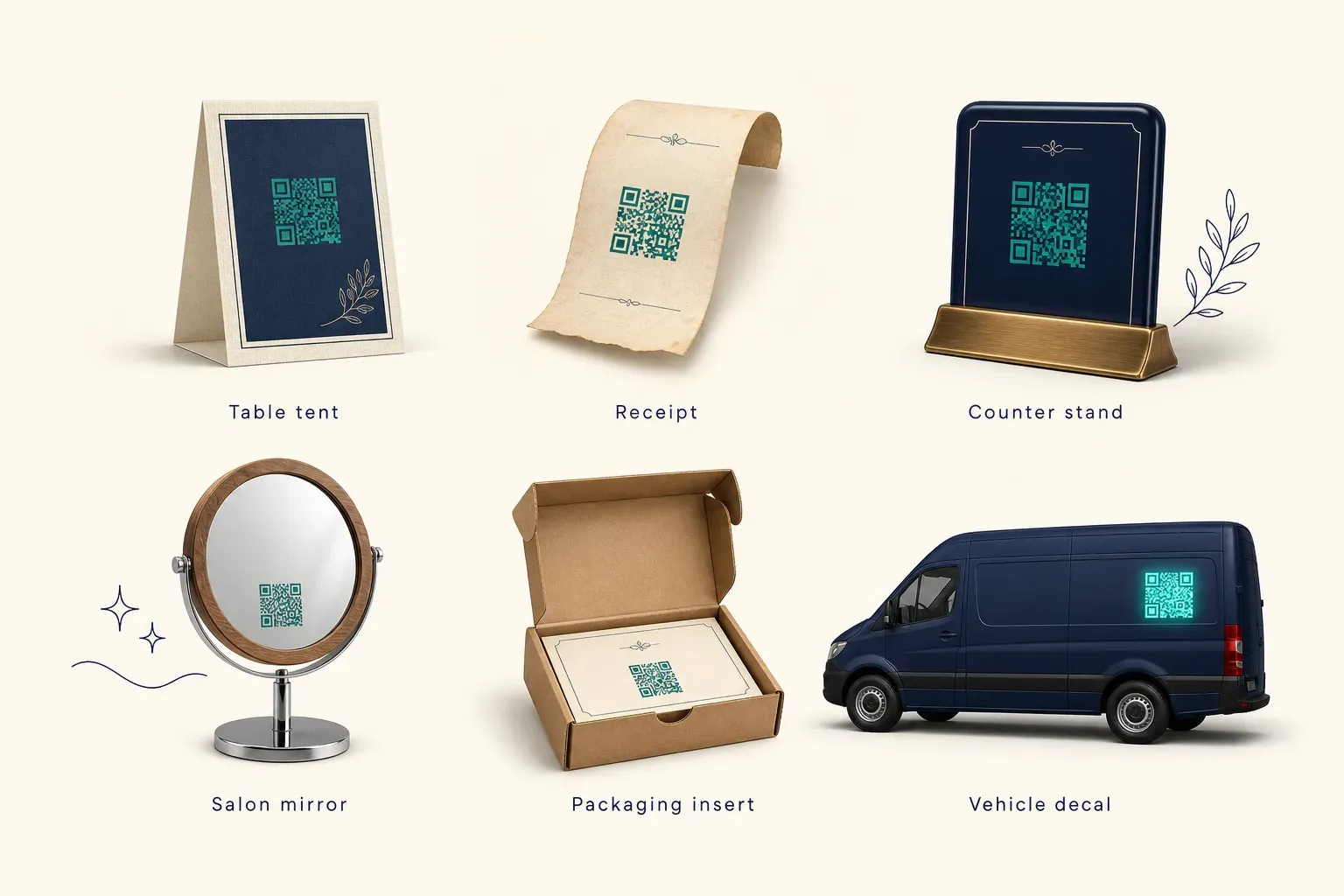
| Surface | The moment it catches | Watch out for |
|---|---|---|
| Salon or barber station mirror | 45 minutes of dwell time, ending on a fresh haircut | Tape it straight; crooked signage reads as neglect |
| Receipt footer | Peak-end moment, customer already looking down at it | Thermal printers blur fine codes; test yours |
| Table tent | Between finishing and paying, the natural lull | Below 2.5 cm the code stops scanning at seated distance |
| Counter or checkout stand | The thank-you exchange, staff can point at it | Works only when staff actually point at it |
| Bathroom mirror sticker | A captive, private minute with phone in hand | Depends on the vibe of your place, as one bar guide put it |
| Thank-you card mailed after a job | Trades: the customer has now lived with the work | Send days later, not the same afternoon |
| Packaging insert | Unboxing, the most engaged your buyer will ever be | Cheap card stock undercuts a premium product |
| Guest WiFi splash page | Customer literally cannot get online without seeing it | Keep it one tap, no form before the form |
| Vehicle decal | The tech is still at the house, work fresh in mind | Pair with a verbal ask or it is just a logo |
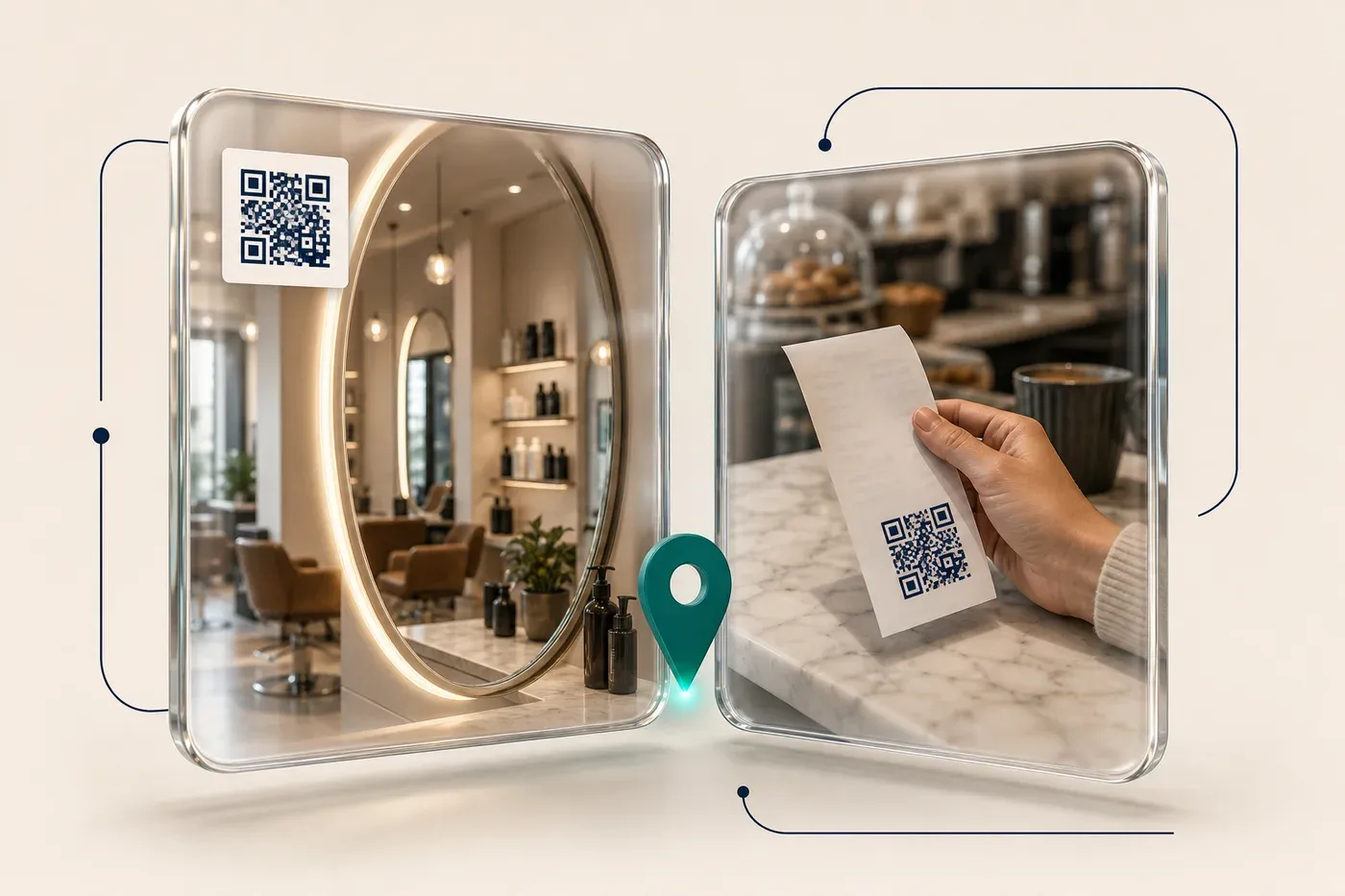
Operators back the top rows with their own numbers. A hairstylist on r/hairstylist keeps a code taped to the station mirror, where every client faces it for the length of the appointment. A restaurant owner on r/restaurantowners prints a short review URL on every receipt, typeable and scannable at once. In the same thread, though, an owner who spent months stickering takeout boxes saw a lift so small he wouldn’t bother again, which fits everything else in this article: a surface earns its printing cost when a human moment points at it, and mostly just sits there when nothing does.
Flyers and door hangers are the exception to everything above. Point those QRs at your Business Profile instead of the review form, since a stranger who has never bought from you has no review to leave, and what they actually need is to read a hundred reviews from people who do.
And if you want the code to earn a smile on the way in, the classic move is the sidewalk chalkboard a sandwich shop wrote inviting everyone to try “the worst meatball sandwich” one Yelp reviewer ever had. Negative review, converted into foot traffic. Dog groomers do a gentler version: a printed report card for the pup, grade A+ in “accepting treats,” QR code at the bottom for the human.
What the Sign Next to the QR Code Should Say
Six words or fewer, name the action, skip the begging. A bare code with no caption becomes part of the furniture, and nobody reads a paragraph taped to a counter. A few lines pulled from what operators use in real shops:
- “Loved it? Tell Google.”
- “Enjoyed your meal? Scan to share it.”
- “If you enjoyed it, tell others. If you didn’t, tell us.”
- “How did we do? yourcafe.com/review” (the receipt version, with the short URL spelled out for people who would rather type)
That third line, the split ask, routes unhappy customers toward a conversation instead of a public one star, without blocking anyone from reviewing. Which is the legal version of what some tools sell as “review gating.” More on that below.
One thing to leave off the sign: the phrase “5 stars.” Asking for five stars specifically is the fastest way to make an honest sign feel like a hustle, and it hands Google a reason to distrust the reviews that follow.
Funny Review Sign Ideas (Steal These)
Humor earns the scan because it breaks the script. A sign that openly admits it wants something reads more honest than one pretending to be decoration, and customers photograph funny signs, which is reach you didn’t pay for. Fifteen lines you’re welcome to adapt, each written for the surface it works best on:
- “Scan this and somewhere in the kitchen, a cook does a small victory dance.” Cafe or restaurant counter
- “Our dog gets excited every time a review comes in. He can't read. We show him anyway.” Groomer or pet-friendly shop
- “You've been looking at this mirror for 40 minutes. Give it 30 more seconds.” Salon station mirror
- “The chef reads every review out loud on Fridays. Make him blush.” Restaurant table tent
- “Yes, a QR code in a bathroom. We have no shame. You have 60 seconds.” Bar bathroom mirror
- “Our five-year-old keeps asking if we're famous yet. Help us stop lying to her.” Family-run shop counter
- “We fixed your leak. Now fix our ego.” Plumber or trades thank-you card
- “If the haircut gets compliments this week, we split the credit on Google.” Barber station
- “This receipt is 90% legal fine print. The QR code is the good 10%.” Receipt footer
- “Warning: scanning this code causes spontaneous high-fives behind the counter.” Checkout stand
- “Our van is spotless. Your driveway is cleaner. Tell the internet.” Home services vehicle decal
- “Every review gets read out at Monday's staff meeting. Yes, even the one about the parking.” Counter card
- “Review us before the food photo goes on Instagram. We know where we rank.” Table tent
- “That code gets you WiFi. This one makes a small business owner's whole week.” Next to the WiFi sign
- “Tell Google what you told your group chat.” Takeout bag sticker
One boundary keeps every line above safe: joke about the ask, never about a reward. The moment a sign promises anything in exchange for a review, free dessert, a discount, a treat for the dog, it stops being funny and starts being a policy violation. The dog can celebrate; he just can’t be the payment.
How Staff Should Ask for the Review
A QR code has never asked anyone for anything. In every high-volume report we could find, the reviews started when somebody on staff said one sentence at the right moment, and the code’s whole job was making yes easy. On its own, a trickle. With the sentence, a stream.
The sentence is short. A cashier who notices a happy customer: “That QR on the counter takes thirty seconds if you ever feel like sharing that.” A server dropping the check at a table that raved about dessert. A detailer who walks the customer around the car first, invites them to point out anything to touch up, and only then mentions the code. The walk-around is the trick: it proves confidence in the work before asking for anything.
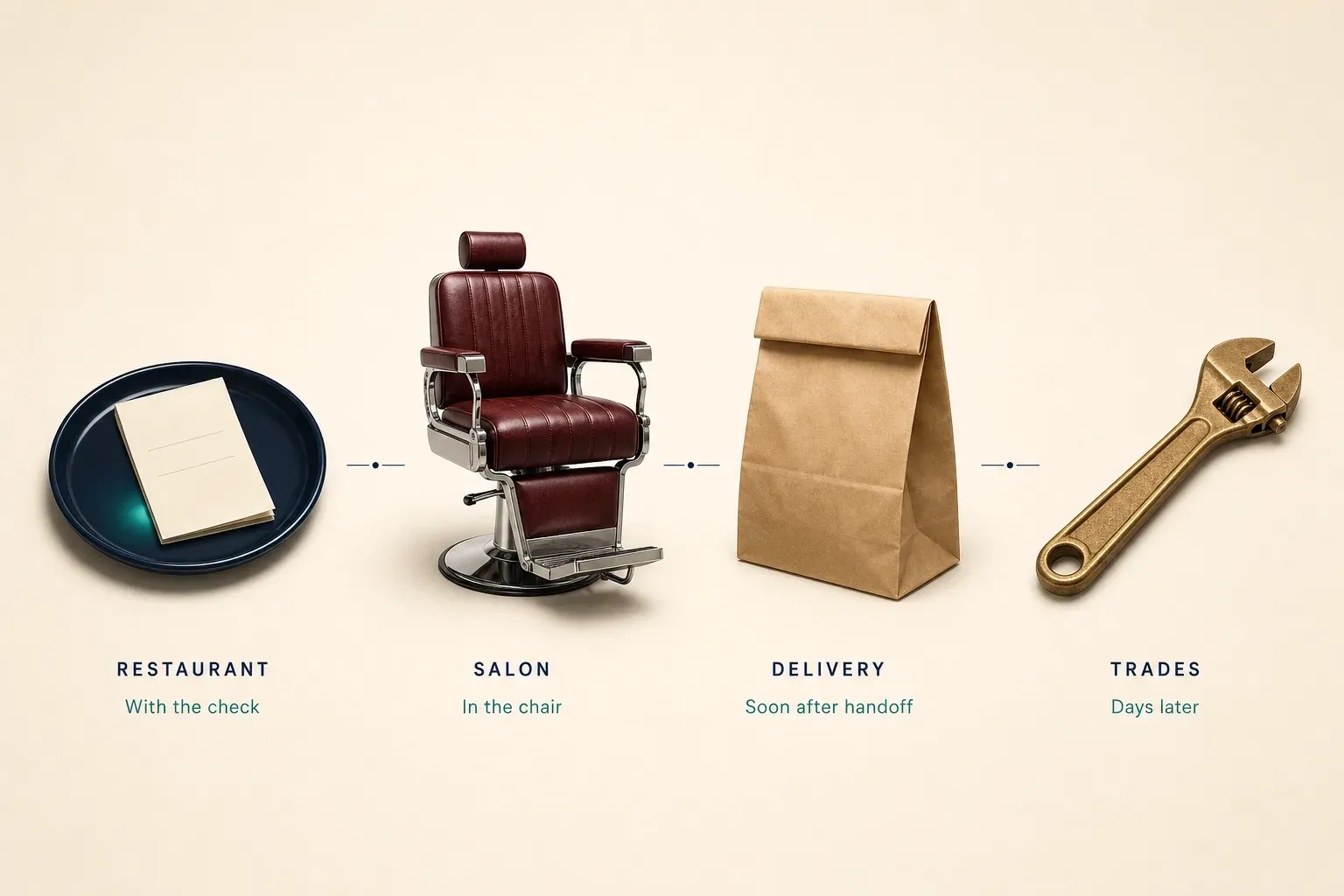
Timing depends on the business. Restaurants ask with the check, never mid-meal. Salons ask in the chair, where the mirror has been doing the selling for the last half hour. For delivery orders, a message 15 to 30 minutes after handoff catches people mid-meal in a good way. And in the trades you wait days, until the customer has lived with the repair, which is exactly when one plumber on r/smallbusiness mails a thank-you card with the code tucked inside.
Once the customer has left, text them the link instead. Tapping beats scanning a phone with another phone, so let the QR work the physical surfaces during the visit and hand the follow-up to a plain message. We covered the psychology of the ask itself, response rates by channel and message shape, in how consumers react to review requests.
Two things backfire: hovering while the customer types, and tying staff bonuses to named five-star mentions so hard that servers start performing for the algorithm. Customers can feel both. Some go home and edit their review to describe the pressure, which is a worse outcome than no review at all.
Rolling Out Review QR Codes Across 20, 50, 200 Locations
One code per location. Always. A shared code funnels every scan into a single location’s review form, which starves the other nineteen and turns your per-location data into noise. Past a handful of sites, the codes need the same discipline you’d give any other rollout:
- Keep a link registry. A sheet with each location, its Place ID, its short URL, and every place the code is printed. When a listing merges or a location moves, you want to know which stickers point where within five minutes.
- Route codes through your own short domain.
brand.com/r/austin-southredirects to the Google form. Survives Place ID changes, and gives you scan counts per location for free. - Ship a kit, not a memo. Franchisees do not resize PNGs. Send print-ready files at table-tent, sticker, and poster sizes, the approved caption lines, and a one-paragraph staff script. They will deploy whatever arrives ready to print and quietly forget whatever arrives as guidelines.
- Watch reviews per location per week. Velocity, not average rating, is the number that tells you whether the rollout is working. A location with live codes and a briefed team shows movement inside two weeks. One still stuck at zero after that usually needs a coaching conversation more than it needs another sticker order.
Managing profile data across that many listings is its own discipline, which we mapped in how to manage Google Business Profiles at scale. The review side, request flows, response automation, per-location velocity dashboards, is what Pluspoint’s review platform was built for.
The Rules: What Google and the FTC Will Punish
Short version: never pay for reviews in any currency, including dessert.
Google’s policy requires reviews to reflect a genuine experience and treats incentivized ones as fake engagement, with removal and listing suspension on the table. Staff reviewing their own workplace counts too. And since October 21, 2024, this stopped being only a platform rule in the US: the FTC’s rule on fake reviews bans buying, selling, and incentivizing reviews, with civil penalties up to $53,088 per violation. And if a review on your own profile crosses these lines, the guide to deleting Google reviews walks through the report-and-appeal machinery.
Some popular QR guides still tell you to offer a discount for a review. That advice ages badly. Beyond the filtered reviews and the suspension risk, customers screenshot these things now: one restaurant’s free-dessert-for-five-stars table tent got the place named in a local “never going back” thread, so a sign meant to collect stars ended up costing them regulars.
Review gating, showing the review form only to customers who first rate you highly in a private survey, violates the same policy. The compliant version is the split ask from earlier: invite feedback through both doors, publicly and privately, and let the customer choose. If you are ever tempted by shortcuts of the paid kind, read what actually happens when businesses buy reviews first.
One more filter to respect: pace. A QR blitz that produces thirty reviews over a launch weekend looks, to Google’s spam systems, like thirty purchased reviews. Roll placements out over weeks and let velocity build like something organic, because it is.
What Happens After the Scan
The review landing is the halfway point. What you do in the following day or two decides whether it compounds into anything.
Respond fast, negatives first. A profile where the owner visibly answers reads as a business somebody actually runs, to customers and to ranking systems both. And read your reviews as operational data while you’re at it, because five separate mentions of slow lunch service is a staffing insight wearing a review’s clothes.
Then there’s where all of this is heading. Review volume, recency, and how you respond are among the signals AI assistants weigh when deciding which businesses to recommend, something we dug into in how local businesses can rank higher in ChatGPT. The unglamorous code on your counter is feeding the machine that answers “best dentist near me” now. Scan-to-review conversion lands in the single digits for nearly everyone, so a 4% rate isn’t failure. Freshness does compound the math, though: 32% of consumers only read reviews written in the past two weeks, per the same Capital One Shopping data, which makes steady weekly velocity worth more than one big spike. Keep score weekly, per location, and give it a few months of patience.
FAQ
Can you make a Google review QR code for free?
Yes, three ways. Google generates a plain one inside your Business Profile (Read Reviews, then Get more reviews). Free generators like ours add a logo and colors in about thirty seconds. Or build the link yourself with your Place ID and feed it to any QR tool.
How do I get Google’s own QR code for reviews?
Open your Business Profile on a desktop computer, select Read Reviews, then Get more reviews, and save the QR image. Desktop only, and the code comes plain: no logo, no colors, no scan counts.
Do Google review QR codes expire?
No. The code lives as long as your Business Profile does. The real risk is a Place ID change after a listing merge or move, which is why volume printing should point at a redirect you control rather than the raw Google link.
How do customers scan it?
Phone camera, tap the popup, review form opens. No app required. One caveat: writing a Google review requires a Google account, so a few scanners will hit a login wall and drop off. Normal, not fixable, priced in.
How do I get a Google review sticker or stand?
Print your code on sticker paper or order a countertop stand and mount the code on it. Keep the code at least 2 x 2 cm with its white margin intact, choose matte stock, and test a scan of the finished object before deploying it.
Can I put my logo inside the QR code?
Yes. In your generator, look for a setting called error correction (a choice of L, M, Q or H) and pick H, the most damage-tolerant level. It keeps the code readable with roughly a third of it covered, which is what a centered logo amounts to. Test on an iPhone and an Android before the print run.
Is it OK to offer a discount for a Google review?
No. Google removes incentivized reviews, and the FTC’s 2024 rule adds US penalties up to $53,088 per violation. Easy scanning plus a well-timed ask outperforms bribery anyway, without the legal tail risk.
Can I use one QR code for all my locations?
You can, but every scan will land on one location’s review form while the rest get nothing, and your per-location data dies. One code per location, tracked separately.
Pluspoint helps multi-location businesses collect reviews, respond with AI, and track reputation across every location from one platform. If the rollout section above described your week, see how Pluspoint handles it, or start with the free QR generator.
Frequently Asked Questions
1. How do I create a QR code for Google reviews?
2. Is it really free to generate a QR code for Google reviews?
3. How can a QR code help me get more Google reviews?
4. Do I need any technical skills to use this QR code generator?
5. Can I customize the QR code to match my branding?
6. Is there an option to handle negative feedback?
7. Can I use this QR code on printed materials?
8. Does the QR code expire or need to be updated?
9. How secure is my information when using this service?
Ready to take your online reputation to the next level?
Upgrade for advanced tools like negative feedback handling, custom QR codes, automated replies, and SMS/WhatsApp invites, all supporting major review platforms.