Pluspoint MCP is live: put your locations, reviews, and review requests inside Claude, ChatGPT, and Gemini
Add the Pluspoint MCP server at app.pluspoint.io/mcp inside Claude, ChatGPT, Gemini, Cursor, or Zed and your AI assistant can read reviews, audit listings, queue review requests, and (soon) draft localised social posts for every location you run. No API key. Two minutes.

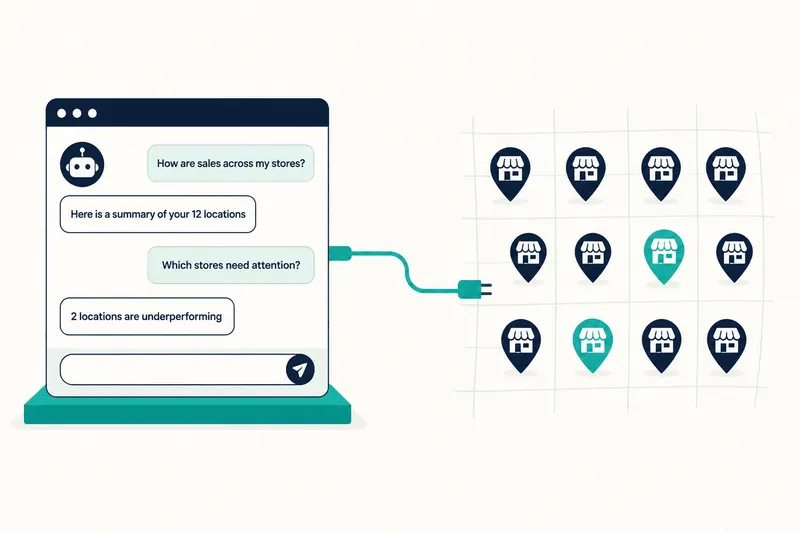
The Pluspoint MCP connects your Pluspoint workspace to any AI assistant that speaks the Model Context Protocol. Add the server at app.pluspoint.io/mcp, click Approve, and your AI tool reads reviews, audits listings, queues review requests, and (soon) drafts localised social posts for every location you run. No API key. Two minutes.
The Pluspoint MCP is generally available as of today. In about two minutes, you can connect Pluspoint to Claude, ChatGPT, Gemini, Cursor, or any other AI assistant your team uses, and the assistant will do real work across every location you run. Pull reviews, fix listings, queue review requests, and (soon) draft localised social posts, all from inside the AI tool you already have open.
If you run 12 dental clinics or 200 restaurants, this is the difference between Monday spent in spreadsheets and Monday spent on the two locations that need your attention.
What MCP is, in plain English
MCP stands for Model Context Protocol. Think of it as a universal adapter for AI assistants. The same way USB lets any keyboard plug into any computer, MCP lets any modern AI assistant plug into any tool that supports it.
Before MCP, getting ChatGPT to check your reviews meant somebody on your team built a custom integration. With MCP, you add one server address to your AI tool, click Approve, and the connection is live. You ask in normal language. The assistant figures out what to look at, pulls the data, and answers.
Pluspoint now supports this. Once connected, the AI assistant can read everything inside your Pluspoint workspace and take actions for you. You stay in the driver’s seat. The assistant only does what you ask.
What you get out of it
The Pluspoint MCP covers four jobs your AI assistant can do across every location. Nothing new to learn. The same features your team uses today, now available from inside the AI assistant.
Listings
Audit every location for missing categories, blank hours, empty service descriptions, or wrong phone numbers, then push fixes into Pluspoint. No scrolling through location pages one by one.
Reviews
Pull reviews across Google, Yelp, DealerRater, Healthgrades, Facebook, and the rest. The assistant groups by city, surfaces complaint themes, and writes the digest.
Review requests
Queue invites by SMS, WhatsApp, or email. Tell the assistant who, when, and which template. Wire your POS or scheduler to trigger sends automatically.
Social postsShipping soon
Draft and schedule localised social posts for every location, with copy that reflects each city instead of reading like duplicates.
A fifth area, AI search visibility (how your locations show up inside ChatGPT, Gemini, and Perplexity), is in beta and joins the MCP later this quarter.
Why this matters for the people who run the locations
Multi-location operators run into the same wall every week. The POS lives in one place. The CRM lives somewhere else. The scheduler is a third tab. The Google Business Profile dashboard is a fourth. The review monitor is a fifth. A question like “which of my 47 locations dropped below 4.3 stars last week and which had a category mismatch?” used to mean a half-day spreadsheet build.
With the MCP connected, you type the question once. The assistant fans out, reads what it needs, and gives you the answer with the location list. The work you used to schedule for Monday morning happens in the time it takes to refill your coffee.
Three shifts show up in the first week most teams use it. Marketing leads stop opening five tabs to assemble a board report. Operations managers ask the AI to surface review patterns by category (food quality, wait times, billing) per location, on demand. Franchise groups and agencies set up small nightly checks that only ping a human when something needs attention.
Connect in two minutes
No developer. No API key. The same flow works in every MCP client.
- 1 Open your AI assistant.
Claude Desktop, ChatGPT, Gemini, Cursor, Zed, or any other client that supports MCP.
- 2 Add the Pluspoint MCP server
at
https://app.pluspoint.io/mcp - 3 Click Approve.
A popup opens. Sign in with your Pluspoint account and confirm access. That’s it.
- 4 Verify.
Ask the assistant: “List the locations in my Pluspoint account.” If your locations come back, you’re connected.
Security note. You authorise the connection with your Pluspoint account login. There is no API key to share or store. Revoke access any time from your Pluspoint account settings and the assistant disconnects immediately.
Prompts that earn their keep
The point of the MCP isn’t to test if it works. It’s to answer the questions you actually need answered. Five prompts that solve real problems on day one.
Reviews
Analyse the reviews of our locations year-to-date. Show me the review velocity trend, the average rating, and the review response rate.
What were the key reasons customers complained last quarter? Group the themes and tell me which locations they came from.
Which locations have the most serious issues right now, and what specifically needs to be addressed at each one?
Listings
Complete the location information across every profile and optimise it for local SEO. Make sure the data is consistent across all locations.
Social posts (shipping soon)
Plan this month’s social calendar for every location. Localise the content by city and queue the posts to publish on schedule.
Every workflow your team runs through the Pluspoint UI can be reframed as a question to the assistant. Start with the ones above. Add your own once you see the shape.
Workflows by vertical
Restaurants
Review volume per location is high and Google does most of the work. Restaurant operators use the MCP for daily review digests, end-of-week complaint summaries by store, and category audits across new openings. Trigger a survey on every check-out tagged as dine-in. Ask the assistant once a week to flag any location whose star average dropped more than 0.2. (For context, see how a 60-location restaurant group doubled online traffic by working reviews this way.)
Dental and healthcare
Reviews are the biggest local-SEO signal in healthcare. Dental and medical groups use the MCP to keep professional degrees, NPI numbers, and category settings accurate at every clinic, and to send post-visit SMS or email surveys. A common workflow: after a hygienist marks a cleaning complete in the scheduler, the event flows into Pluspoint, and the survey goes out a few hours later. The assistant also handles compliance-style audits.
Automotive dealerships
Car buyers lean heavily on reviews. Dealerships use the MCP to pull reviews across Google, DealerRater, and Cars.com in one digest, route negative reviews to the right manager by store, and queue review invites after a service appointment closes. Auditing service-department hours and contact info across the group is the second-most-common job.
Home services
Plumbing, HVAC, electrical, and roofing groups use the MCP to queue a review request as soon as the technician marks a job complete, pull a weekly digest, and audit listings for missing service descriptions or wrong hours. The assistant can also flag locations whose review velocity has dropped, which usually means the field crew stopped asking for reviews.
Franchise and multi-brand groups
If you run more than one brand under one roof, the MCP filters by brand, region, or specific location list. Common jobs: brand-level scorecards, region-level rollouts of survey templates, and audits that compare brand A versus brand B on listing completeness or review velocity.
Tips for getting good results
A few habits that make AI assistants behave well with Pluspoint data.
- Be specific about the period. “This week” or “the last 14 days” beats “lately.”
- Name the location set. “All my Texas dental clinics” or “the 12 locations under brand X” gives a tighter answer than “all locations.”
- Ask for the format you want. “Give me a one-paragraph summary” or “give me a table with location name, review count, and average rating” both work.
- Run a dry pass on write actions. Ask the assistant to first list the locations it would change and confirm before it makes the change.
- Use plain language. Surveys, review requests, and invites all work. The assistant handles the translation.
What the MCP does not do yet
A few honest gaps to plan around.
- Social posts are wired up on the product side and ship into the MCP soon. Until then, the social prompt above will queue but not publish.
- AI search visibility data (share-of-voice across ChatGPT, Gemini, and Perplexity) is in beta and joins the MCP later this quarter.
- The assistant can draft review responses but cannot publish them on your behalf today. Publishing still happens inside Pluspoint. The next release closes that loop.
- Monthly SMS, WhatsApp, email, and social publishing caps from your plan still apply. If the assistant hits a cap, it stops and tells you the queue paused.
We will keep this list current as each capability ships.
FAQ
What is the Pluspoint MCP?
The Pluspoint MCP is a connector that lets any AI assistant which supports the Model Context Protocol read and update your Pluspoint workspace. It covers listings, reviews, review requests, and social posts. Compatible assistants include Claude, ChatGPT, Gemini, Cursor, Windsurf, and Zed.
Is the Pluspoint MCP free to use?
The connector is free for any Pluspoint customer. Your plan’s monthly SMS, WhatsApp, email, and social publishing caps still apply when the assistant takes those actions on your behalf.
Do I need a developer or an API key to set this up?
No. Open your AI tool, add the Pluspoint MCP at app.pluspoint.io/mcp, and click Approve in the popup. No API key. No client-specific configuration. The same flow works in Claude, ChatGPT, Gemini, Cursor, and any other MCP client.
Which AI assistants can I use the Pluspoint MCP with?
Any client that supports MCP. The list today includes Claude Desktop, ChatGPT (Connectors and the Apps SDK), Gemini through the Google Gemini API and Vertex AI Agent Builder, Cursor, Windsurf, Zed, JetBrains AI Assistant, the Vercel AI SDK, and the OpenAI Agents SDK.
Can the AI assistant send review requests for me?
Yes. Once your channels and survey templates are configured inside Pluspoint, the assistant can queue invites by SMS, WhatsApp, or email. WhatsApp sends use templates with interactive buttons, which Pluspoint manages for you.
When do social posts ship?
Social posts are joining the MCP soon. Once live, the assistant can draft localised content per location, propose a calendar, and queue posts to publish through Pluspoint. Until then, the listings, reviews, and review request capabilities are fully live.
Will the AI assistant change my Google Business Profile data?
Only when you tell it to. Read-only workflows like digests, audits, and board reports never touch your listings. Write actions happen inside Pluspoint and sync to your connected sources from there, the same way any change in the dashboard does.
Is my data safe?
You authorise the connection with your Pluspoint account login. There is no API key to share or store. You can revoke access at any time from your Pluspoint account settings, which disconnects the assistant immediately.
What if my AI assistant hits a usage limit?
You’ll see a clear error and the queue stops. SMS, email, and social publishing caps come from your Pluspoint plan. For a big rollout, ping your account manager so we can size the plan correctly first.
What comes next?
Social posts, AI search visibility tooling, review response publishing, and listings publish status. We’ll keep this article current as each ships.
Dmytro Semonov is CMO at Pluspoint. Pluspoint is the local AEO and GEO platform for multi-location brands, covering Google Business Profile, reviews, listings, AI search visibility, and social posts across restaurants, dental, automotive, and home services.